Fed up of trying to remember passwords for all your accounts? PassEto allows you to manage all your passwords in a simple and safe way. Rather than storing your credentials, PassEto uses a repeatable method of generating passwords for each of your accounts, so you can always access them.
Version 3 is a complete rewrite of the app, with stronger encryption, custom password lengths, and an optional account list that helps you keep track of everything without ever storing a single password.
Protect Yourself
Create a unique, strong password for every account. Because PassEto never stores passwords, there is nothing to be stolen or lost. Version 3 uses Argon2id, a modern algorithm designed to resist even the most powerful cracking hardware.
Easy to Use
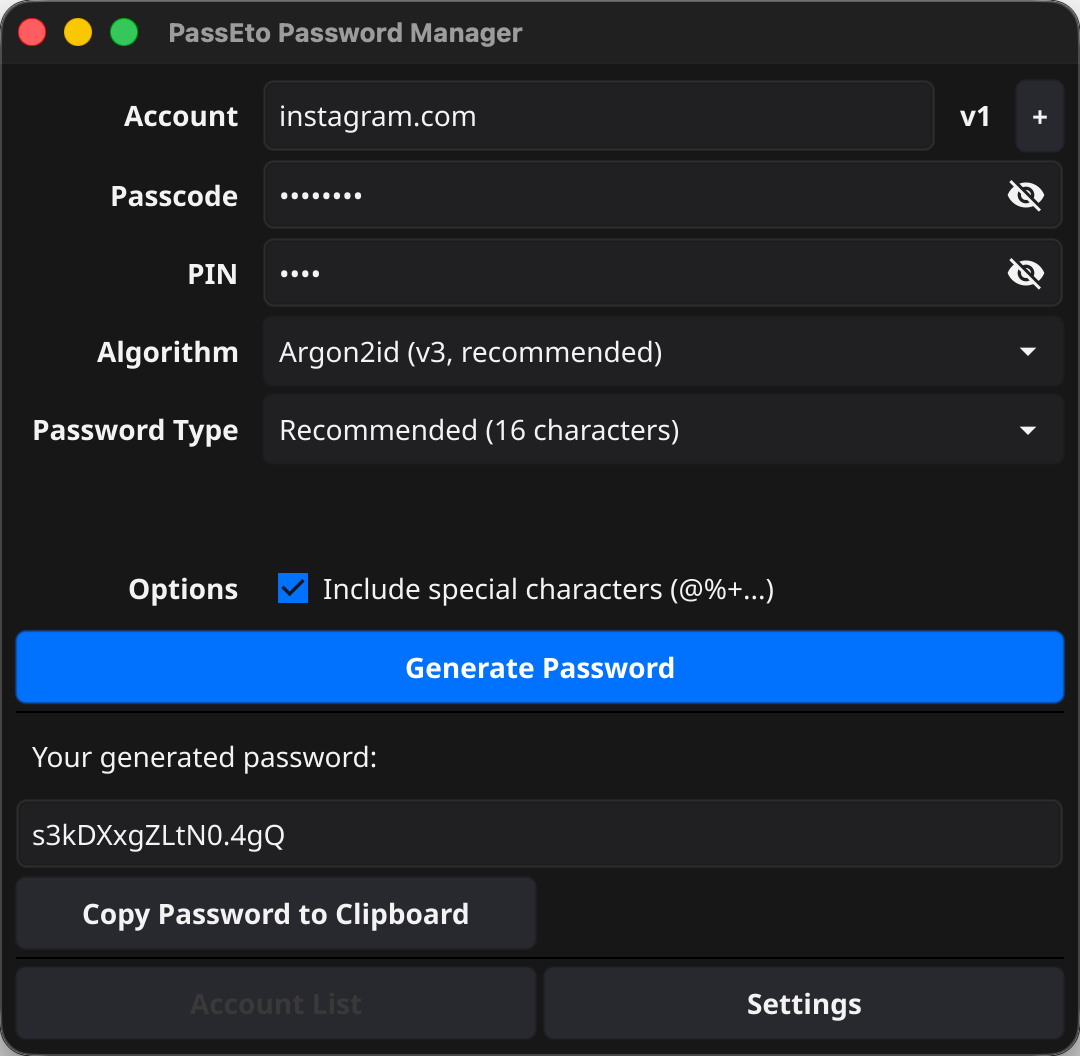
Remember a single passcode and PIN for all your accounts. Just add an account name and click Generate. That’s all you ever need to remember: no key files, no recovery codes, no master vault.
Your Accounts, Not Your Passwords
Optionally save your account details so PassEto remembers the settings you used for each site. The password itself is never saved, anywhere, ever.
Free, Everywhere, No Cloud Required
No account or subscription. No dependency on any cloud service. Install the desktop app on Windows, Mac, or Linux, or use the online version at www.passeto.com from any device.
What’s New in Version 3
- Stronger encryption. New passwords are generated with Argon2id, a modern memory-hard algorithm that makes brute-force attacks impractical, even with specialist hardware. Passwords created with earlier versions of PassEto still work: just select the Legacy algorithm.
- Save your account details. PassEto can now keep an encrypted list of the accounts you’ve created passwords for, recording the settings used for each one. Your passwords are never part of this list.
- Custom password lengths. Choose the recommended 16 characters, or set any length you like to suit each site’s rules.
- Password versions. If a website you use suffers a breach, click the + button to step up the version number and generate a completely new password for that site, without changing your passcode or PIN.
How to Use PassEto
Before you start, choose a secret passcode and PIN that you’ll use every time, and keep these constant. When naming accounts, use a logical, consistent identifier such as facebook.com rather than a description that might vary.
To generate a password:
- Enter the account identifier (e.g.
facebook.com) - Enter your passcode and PIN
- Choose a password type, or set a custom length
- Click Generate Password
The same inputs will always produce the same password, so you never need to store anything.
Download PassEto
PassEto is free. Choose your platform:
Prefer not to install anything? Use the web version at www.passeto.com. If the Windows app shows a blank window, which can happen on older graphics hardware, try the alternative Windows build instead. This build is also a better fit for virtual machines and cloud desktops such as Windows 365, where 3D graphics support is often limited.
Keeping Track of Your Accounts
The account list is entirely optional; PassEto works fully without it. Turn it on and PassEto keeps a record of each account you generate a password for: the account name, the password length, whether special characters were included, the algorithm, the password version, and the date. The password itself is never stored.
This solves the one awkward part of a stored-nothing password manager: remembering which settings you used for each site. With the list enabled, type an account name and PassEto fills in the right settings for you.
A few things worth knowing:
- The list is saved as a single encrypted file on your computer, locked with a key derived from your passcode and PIN. Nothing is sent to us or anyone else.
- Because it’s just one file, you can sync it between your own devices using whatever you already trust: Dropbox, iCloud, a USB stick, or any other service. PassEto itself never touches the cloud.
- You can print the whole list and keep a paper copy. That might sound alarming for a password manager, but remember what’s on it: account names and settings, not passwords. Without your passcode and PIN, the list is of very little help to anyone.
Frequently Asked Questions
How does it work?
PassEto combines your passcode, PIN, and account name and feeds them through Argon2id, a key derivation function designed for exactly this job. It is deliberately slow and memory-hungry, which you’ll never notice for a single password, but which makes guessing billions of combinations infeasible for an attacker. The same inputs always produce the same output (your password) without ever storing it.
Do you save my passwords?
No. PassEto never saves your passcode, PIN, or any generated passwords. Even if you enable the account list, it records only the settings used for each account, never the password itself. Nothing is ever sent to a server.
I’ve used PassEto for years. Will my old passwords still work?
Yes. Select Legacy from the algorithm dropdown and version 3 reproduces your existing passwords exactly. We recommend moving accounts over to the new Argon2id algorithm as you go: generate a new password with the new algorithm and update it on the site.
What if a website I use gets breached?
You need a new password for that site, but you don’t want to change your passcode and PIN everywhere else. Click the + button next to the account name to increase the password version, then generate. You get a completely different password for that site, and your other accounts are unaffected. If the account list is enabled, PassEto remembers which version you’re on.
Can my master passcode and PIN be found?
There is no way of reversing the mathematical process. Argon2id is specifically designed to resist brute-force attacks: each guess costs an attacker significant time and memory, so trying every combination would take longer than a lifetime, even with racks of dedicated hardware.
What if I forget my passcode or PIN?
You have a problem! The irreversible design means there is no recovery mechanism, which is what makes it secure. Choose something you’ll never forget and keep it private.
What if someone finds out my passcode and PIN?
Change your credentials immediately and regenerate passwords for all your accounts. Because PassEto is deterministic, new inputs will produce entirely different passwords across every account.
How It Works: More Detail
Life has changed, but the human brain hasn’t. Every computer system and website we use requires an account and a password. Using the same password across services is dangerous: when one site is compromised, all your accounts become vulnerable. Unique, strong passwords for every account are the answer, but remembering them all is cognitively impossible.
Traditional password managers store your encrypted credentials behind a master password, relying on third-party services and infrastructure to remain available and secure. PassEto takes a different approach: it generates passwords on demand rather than storing them, eliminating the risk of a vault being stolen.
Given the same inputs (account identifier, master passcode, PIN, and version), PassEto always produces the same password. Your credentials are never written to disk, sent to a server, or held in memory beyond the moment of generation. There is nothing to breach.

For the technically minded: version 3 derives passwords using Argon2id, the winner of the Password Hashing Competition, with memory-hard parameters that neutralise GPU and ASIC cracking. The optional account list is a single JSON file encrypted with AES-256-GCM, using a key derived from your passcode and PIN through the same Argon2id function. That key is never written anywhere; it is recomputed each time you use the app. The file contains account names and generation settings only, so even a decrypted copy would hand an attacker nothing but a list of sites you use.